





⚡Key Takeaways
- Databricks is best for organizations prioritizing advanced analytics, AI/ML workloads, and unified data engineering. Its open architecture and support for multiple data formats make it ideal for data scientists and engineering teams who need flexibility and power.
- Snowflake excels for companies seeking a simple, scalable, and highly performant cloud data warehouse. It’s the go-to for business intelligence, reporting, and teams that want to minimize infrastructure management.
- Qrvey is a compelling alternative for SaaS providers and multi-tenant analytics, offering embedded analytics, automation, and GenAI features tailored for software companies.
- Choose Databricks if you need end-to-end data pipelines and AI integration; choose Snowflake for seamless SQL analytics and cost-effective scaling. Qrvey stands out for embedded analytics and SaaS-focused use cases.
Choosing the right cloud data platform is a pivotal decision for any organization aiming to unlock the full value of its data. Whether you’re a data engineer, business analyst, or SaaS product leader, the choice between Databricks and Snowflake can directly impact your team’s productivity, scalability, and innovation.
In 2026, the competition between these two platforms is fiercer than ever, with both offering robust features for analytics, AI, and data warehousing.
- If your primary goal is advanced analytics, machine learning, and unified data engineering, Databricks is the frontrunner.
- For those seeking a streamlined, scalable, and cost-effective cloud data warehouse for business intelligence and reporting, Snowflake remains the top choice.
- And for SaaS providers or multi-tenant analytics needs, Qrvey offers a differentiated, embedded analytics solution.
This article delivers a vendor-neutral, side-by-side comparison of Databricks and Snowflake, covering architecture, performance, pricing, scalability, and use cases. You’ll find actionable insights, expert opinions, and real-world reviews to help you make the best decision for your organization.
Databricks vs Snowflake: Quick Comparison Table
| Databricks | Snowflake | |
| Best For | Advanced analytics, AI/ML, unified data engineering, data science teams | Business intelligence, reporting, scalable cloud data warehousing |
| Stand Out Feature | Lakehouse architecture, native ML integration, open format support | Separation of compute/storage, instant scaling, zero management |
| Price | Usage-based, with tiered options for compute and storage | Usage-based, per-second billing, multiple editions |
| Pros | Flexible, powerful, supports multiple languages and formats, strong ML tools | Simple, fast, highly scalable, minimal admin, broad ecosystem |
| Cons | Steeper learning curve, may require more engineering resources | Limited advanced ML, less flexible for custom data engineering |
| Customer Support | Enterprise support, community forums, dedicated account managers | 24/7 support, extensive documentation, active user community |
| Data Sources | Delta Lake for ACID transactions | Secure data sharing across clouds |
| Ease of Use | Collaborative notebooks | Automatic clustering |
| Integrations | MLflow integration | Time travel for data |
| Other Niche-relevant Features | Real-time streaming analytics | Native semi-structured data support |
Who is Databricks Best For?
Databricks is designed for organizations that need powerful, flexible analytics and machine learning capabilities. It’s especially well-suited for data science teams, advanced analytics groups, and enterprises building unified data pipelines across diverse sources.
If your business relies on large-scale data engineering, real-time analytics, or AI-driven insights, Databricks offers the tools and architecture to support these needs. Its collaborative notebooks and support for multiple programming languages make it a favorite among technical teams who value experimentation and innovation.
Best for:
- Data scientists and engineers working with big data and AI/ML projects
- Enterprises needing unified data lakes and warehouses (lakehouse architecture)
- Teams requiring real-time streaming analytics and advanced data processing
- Organizations prioritizing open-source integration and flexibility
For Whom is Snowflake Useful?
Snowflake is the platform of choice for companies seeking a simple, scalable, and highly performant cloud data warehouse. Its intuitive SQL interface and separation of compute and storage make it ideal for business intelligence teams, analysts, and organizations that want to minimize infrastructure management. Snowflake’s instant scaling and secure data sharing features are particularly valuable for businesses with fluctuating workloads or those collaborating across departments and partners.
Best for:
- Business analysts and BI teams focused on reporting and dashboarding
- Organizations needing seamless, scalable cloud data warehousing
- Companies with multi-cloud or cross-region data sharing requirements
- Teams looking for minimal setup and ongoing management
Qrvey: An Alternative
For SaaS providers and organizations seeking embedded analytics, Qrvey stands out as a modern alternative to both Databricks and Snowflake. Qrvey for embedded analytics is purpose-built for software companies that need to deliver analytics, automation, and AI-driven insights directly within their applications. Unlike traditional data platforms, Qrvey offers a no-code/low-code environment, making it accessible to product managers, developers, and business users alike.
Key USPs
- Embedded Analytics: Qrvey enables seamless integration of dashboards, reports, and self-service analytics into SaaS products, enhancing user engagement and product value.
- Multi-Tenant Architecture: Designed for SaaS, Qrvey supports secure, scalable analytics across multiple customers or business units.
- Automation & GenAI: Advanced automation tools and generative AI features help automate workflows, trigger alerts, and surface insights without manual intervention.
- Flexible Deployment: Qrvey can be deployed on AWS or within your own cloud environment, offering full control over data and compliance.
Qrvey Pricing
| Plan | Best For | Key Features | Deployment |
| Qrvey Pro | Fast, lightweight analytics | Embedded dashboards, reporting, automation, AI | Your cloud (AWS/Azure/GCP coming soon) |
| Qrvey Ultra | Full-stack, high-performance | Built-in data engine, transformation layer, advanced security, multi-cloud | Your cloud (AWS/Azure/GCP coming soon) |
Request Qrvey pricing right now.
Pricing
When evaluating Databricks and Snowflake, pricing is a critical factor that can influence your decision. Both platforms use usage-based pricing models, but their structures and cost drivers differ. Understanding these differences will help you estimate total cost of ownership and align your choice with your organization’s budget and usage patterns.
Databricks
Databricks offers a flexible, usage-based pricing model that charges for compute, storage, and additional features. Pricing varies by cloud provider (AWS, Azure, GCP) and by the level of support and features required.
- Compute Pricing: Pay-as-you-go for virtual machines and clusters, with options for reserved capacity.
- Storage Costs: Charged separately, typically based on the amount of data stored in Delta Lake.
- Feature Tiers: Standard, Premium, and Enterprise editions offer varying levels of security, collaboration, and support.
- Additional Costs: Advanced features like MLflow, real-time streaming, and enterprise security may incur extra charges.
Snowflake
Snowflake’s pricing is also usage-based, with a focus on simplicity and transparency. Customers are billed for compute (virtual warehouses), storage, and data transfer.
- Compute: Charged per-second for active virtual warehouses, with instant scaling up or down.
- Storage: Billed monthly for the amount of data stored, with automatic compression and optimization.
- Editions: Standard, Enterprise, Business Critical, and Virtual Private Snowflake (VPS) editions cater to different security and compliance needs.
- Additional Features: Data sharing, time travel, and secure data exchange are included in most plans, with some advanced features available in higher tiers.

Verdict
Both Databricks and Snowflake offer transparent, usage-based pricing, but the best value depends on your specific needs. Databricks may be more cost-effective for AI/ML-heavy workloads, while Snowflake’s per-second billing and instant scaling make it ideal for variable BI and reporting demands. You can use Qrvey’s Snowflake pricing calculator to estimate the cost.
NOTE: Always use each vendor’s pricing calculator and consult with sales for the most accurate estimate.
Cost Savings with Qrvey
SaaS companies typically start with Databricks or Snowflake and then integrate Qrvey for major cost savings. For SaaS companies, data warehouse costs skyrocket with scale and growth.
A business using a multi-tenant model (such as a SaaS business) processes analytics queries across tenants around the clock, and those analytics queries are constantly scaling up and down with demand. This is why the usage-based cost structure doesn’t fit within the SaaS model.
Qrvey offers a more cost-effective solution. Qrvey’s embedded analytics platform combines analytics widgets in a single dashboard using multiple data sources.
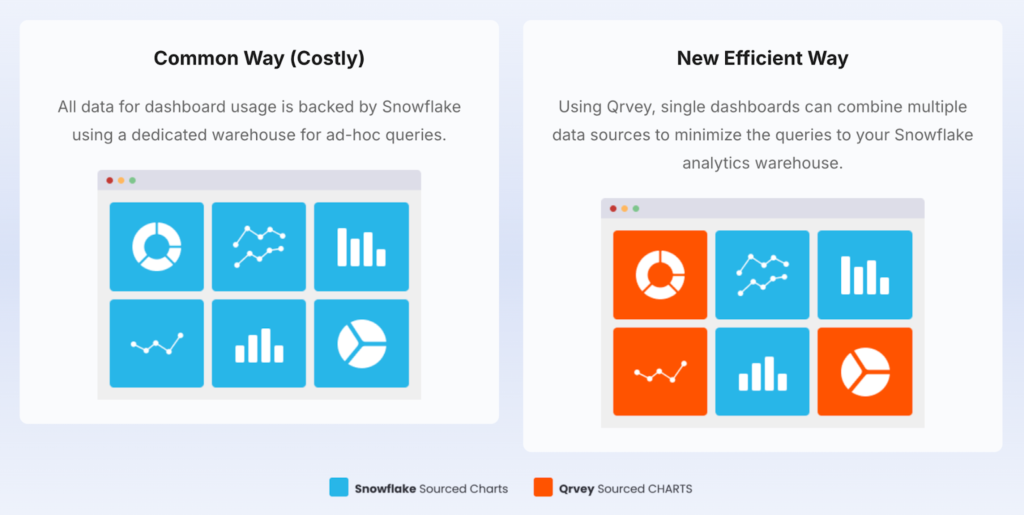
Real cost savings are seen when you use Qrvey for near-real time data queries and using Snowflake (for example) only for real-time queries. See illustration below.
Snowflake (in this example) will remain as your primary source of record for all data, but Qrvey can be used as a processing layer. You can sync data to Qrvey on a schedule based on reporting needs.
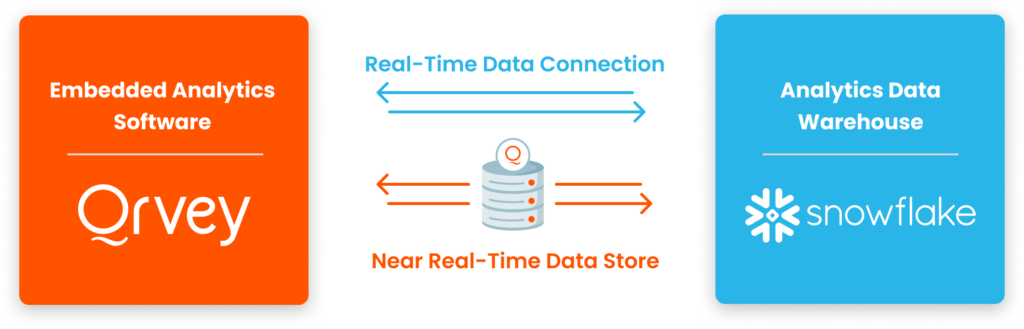
Qrvey’s native processing layer can dynamically query data from multiple sources, routing the query to the appropriate source.
This flexibility delivers analytics that are current, comprehensive, and cost-efficient across both real-time dashboards and interactive exploratory analysis.
Ease of Use
Selecting a data platform that’s easy to use can dramatically reduce onboarding time and ongoing maintenance. Both Databricks and Snowflake have invested heavily in user experience, but their approaches differ. Ease of use is especially important for teams with varying technical backgrounds, as it impacts adoption, productivity, and long-term satisfaction.
Databricks
Databricks offers a robust environment tailored for technical users, especially data engineers and scientists. Its collaborative notebooks, support for multiple programming languages (Python, SQL, Scala, R), and integration with popular ML frameworks make it a powerhouse for advanced analytics. However, the platform’s flexibility can mean a steeper learning curve for non-technical users.
- Collaborative Notebooks: Real-time editing and sharing for teams working on data projects.
- Rich Documentation: Extensive guides, tutorials, and community forums support onboarding.
- Customizable Workflows: Users can build complex pipelines, but may require more setup and configuration.
- Integration with IDEs: Supports direct connections to tools like VS Code and Jupyter.
Snowflake
Snowflake is renowned for its simplicity and intuitive interface. Business analysts and non-technical users can quickly get started with its web-based SQL editor, drag-and-drop features, and automated scaling. The platform abstracts away infrastructure management, allowing users to focus on data analysis rather than setup.
- Intuitive SQL Editor: Clean, web-based interface for querying and managing data.
- Automated Scaling: No need to manage clusters or resources—Snowflake handles it all.
- Quick Onboarding: Minimal setup required; users can start analyzing data within minutes.
- Extensive Training Resources: Video tutorials, documentation, and active user community.
Verdict
Snowflake wins on ease of use for most organizations, especially those with business users and analysts. Its intuitive interface and automated management make it accessible to a wider audience. Databricks, while more powerful for technical teams, may require additional training and setup.
Customer Support
Reliable customer support is essential for resolving issues quickly and maximizing platform value. Both Databricks and Snowflake offer enterprise-grade support, but their offerings and user experiences differ.
Databricks
Databricks provides comprehensive support options, including dedicated account managers for enterprise clients, 24/7 technical assistance, and a vibrant community forum. Premium support tiers offer faster response times and personalized guidance.
- Enterprise Support: Priority access to technical experts and solution architects.
- Community Forums: Active user base sharing tips, solutions, and best practices.
- Dedicated Account Managers: Personalized support for strategic customers.
- Extensive Documentation: Guides, FAQs, and troubleshooting resources.
Snowflake
Snowflake’s support is known for its responsiveness and depth. Customers benefit from 24/7 assistance, a rich knowledge base, and regular webinars. The platform’s documentation is frequently updated, and the user community is highly engaged.
- 24/7 Support: Round-the-clock help for all customers, with priority tiers available.
- Knowledge Base: Comprehensive articles, tutorials, and troubleshooting guides.
- User Community: Forums and events for sharing experiences and solutions.
- Regular Webinars: Training sessions and product updates to keep users informed.
Verdict
Both platforms offer strong customer support, but Snowflake’s responsiveness and extensive self-service resources give it a slight edge for organizations that value quick, reliable assistance.
Integrations
The ability to integrate with other tools and platforms is a crucial consideration when choosing a data solution. Integrations can streamline workflows, enable richer analytics, and ensure your data ecosystem remains flexible and future-proof. Both Databricks and Snowflake offer extensive integration options, but their approaches and supported technologies differ.
Databricks
Databricks is built for interoperability and supports a wide range of integrations across data sources, analytics tools, and cloud services. Its open architecture allows seamless connections to popular BI platforms, data lakes, and machine learning frameworks.
- Cloud Integrations: Native support for AWS, Azure, and Google Cloud, enabling hybrid and multi-cloud deployments.
- BI Tools: Connects easily to Tableau, Power BI, Looker, and other visualization platforms.
- Data Sources: Integrates with Delta Lake, Apache Kafka, MongoDB, and more for real-time and batch data processing.
- ML Frameworks: Direct integration with TensorFlow, PyTorch, MLflow, and other machine learning libraries.
Snowflake
Snowflake excels in providing simple, secure integrations with a broad ecosystem of data and analytics tools. Its architecture is designed for fast, reliable connections to cloud services, BI platforms, and third-party applications.
- Cloud Services: Runs natively on AWS, Azure, and Google Cloud, supporting cross-cloud data sharing.
- BI & Analytics: Integrates with Tableau, Power BI, Qlik, and dozens of other analytics tools.
- Data Exchange: Features secure data sharing and marketplace integrations for accessing third-party datasets.
- ETL & Data Prep: Works with Fivetran, Matillion, Talend, and other ETL solutions for streamlined data ingestion.
Further reading: Introducing Qrvey’s Snowflake Integration for Embedded Analytics
Verdict
Both platforms offer robust integration capabilities, but Databricks is ideal for organizations needing deep customization and advanced data engineering. Snowflake’s simplicity and secure data sharing make it a strong choice for businesses prioritizing fast, reliable connections and broad ecosystem support.
Other Niche-Relevant Feature Comparison
Beyond the core features, Databricks and Snowflake each offer unique capabilities that may be critical for specific industries or advanced use cases. Evaluating these niche features can help you find the best fit for your organization’s requirements.
Databricks
Databricks stands out with its support for real-time streaming analytics, collaborative data science environments, and advanced security features.
- Streaming Analytics: Process and analyze data in real time using Apache Spark and Delta Lake.
- Collaborative Workspaces: Enable teams to work together on notebooks, experiments, and dashboards.
- Advanced Security: Enterprise-grade controls, including role-based access and data encryption.
Snowflake
Snowflake offers features tailored for secure data sharing, time travel, and automated optimization.
- Secure Data Sharing: Instantly share data across departments, partners, or even clouds without moving or copying files.
- Time Travel: Access historical versions of your data for auditing, recovery, or analysis.
- Automatic Optimization: Snowflake continuously tunes performance and storage, reducing manual intervention.
Verdict
Databricks is best for organizations needing real-time analytics and collaborative data science, while Snowflake excels in secure data sharing and automated optimization. Consider your industry’s specific needs when evaluating these advanced features.
How to Choose the Best Cloud Data Warehouse Platform
Selecting the right cloud data warehouse platform is more than just comparing features—it’s about aligning technology with your organization’s goals, team skills, and future growth.
The best solution will depend on your data volume, analytics needs, security requirements, and integration preferences. By evaluating key features and considering how each platform supports your business objectives, you can make a confident, future-proof decision.
Feature Consideration #1: Scalability & Performance
Scalability is essential for organizations that expect data growth or fluctuating workloads. Both Databricks and Snowflake offer elastic scaling, but their approaches differ. Databricks provides granular control over compute resources, making it ideal for complex, resource-intensive analytics. Snowflake’s instant scaling and separation of compute and storage allow users to adjust resources on the fly, ensuring consistent performance even during peak usage.
Qrvey’s multi-tenant architecture is designed for SaaS providers who need to scale analytics across thousands of customers without sacrificing performance. Its elastic infrastructure ensures smooth scaling as your user base grows.
Feature Consideration #2: Data Security & Compliance
Security and compliance are non-negotiable for organizations handling sensitive data. Databricks offers enterprise-grade security features, including role-based access controls, encryption, and audit logs. Snowflake provides robust security with automatic encryption, network policies, and compliance certifications (SOC 2, HIPAA, GDPR). Both platforms support fine-grained access controls and data masking.
Qrvey’s platform includes built-in security features tailored for SaaS environments, such as tenant isolation, data encryption, and compliance support for industry standards.
Feature Consideration #3: Integration & Automation
Integration capabilities can make or break your analytics workflow. Databricks excels in connecting with open-source tools, cloud services, and machine learning frameworks. Snowflake offers seamless integration with BI platforms, ETL tools, and cloud ecosystems. Automation features, such as workflow orchestration and event-driven triggers, are increasingly important for modern data teams.
Qrvey’s automation engine enables users to build custom workflows, trigger alerts, and automate data processes without coding. This empowers SaaS providers to deliver dynamic, responsive analytics experiences.
Alternative To Databricks and Snowflake: Qrvey
While Databricks and Snowflake dominate the conversation around cloud data platforms, Qrvey offers a compelling alternative—especially for SaaS providers and organizations seeking embedded analytics and automation.
Qrvey is purpose-built for software companies that want to deliver analytics directly within their applications, enabling product teams to offer powerful data experiences without the complexity of traditional data warehouses.
Product Overview
Qrvey is an all-in-one analytics platform designed for multi-tenant SaaS environments. Unlike Databricks and Snowflake, which focus on data engineering and warehousing, Qrvey specializes in embedded analytics, automation, and GenAI features.
Its no-code/low-code interface empowers product managers, developers, and business users to create dashboards, automate workflows, and surface insights—all within a secure, scalable environment.
Key Differentiators
- Embedded Analytics: Seamlessly integrate dashboards, reports, and self-service analytics into your SaaS product, enhancing user engagement and retention.
- Multi-Tenant Architecture: Built for SaaS, Qrvey supports secure, isolated analytics for each customer or business unit, simplifying compliance and scaling.
- Automation & GenAI: Advanced automation tools and generative AI capabilities help automate repetitive tasks, trigger alerts, and deliver actionable insights.
- Flexible Deployment: Deploy Qrvey on AWS or within your own cloud environment, maintaining full control over data residency and compliance.
Key Features
Qrvey’s feature set is designed to address the unique needs of SaaS providers and modern software teams:
Stand Out Feature #1: Embedded Analytics
Qrvey enables you to embed interactive dashboards and reports directly into your application, providing end-users with real-time insights without leaving your platform.
Stand Out Feature #2: Automation Engine
The platform’s automation tools allow you to build custom workflows, trigger notifications, and automate data processes—all without writing code.
Stand Out Feature #3: GenAI Integration
Qrvey leverages generative AI to help users discover trends, generate summaries, and surface recommendations, making analytics more accessible and actionable.
Qrvey Pricing Overview
Qrvey offers transparent, scalable pricing tailored to SaaS providers. Contact Qrvey for a custom quote based on your usage, deployment preferences, and feature needs. Plans are available for startups to large enterprises.
Request Qrvey pricing quickly and easily here.
Where Qrvey Shines
- SaaS-Focused Design: Qrvey is built from the ground up for multi-tenant SaaS analytics, making it a natural fit for software companies.
- Rapid Deployment: No-code/low-code tools enable fast implementation and iteration, reducing time-to-value.
- Automation & AI: Advanced automation and GenAI features streamline analytics and drive smarter decision-making.
Where Qrvey Falls Short
- Not a General-Purpose Data Warehouse: Qrvey is not designed for heavy-duty data engineering or massive-scale ETL pipelines like Databricks or Snowflake.
- Limited Open-Source Integrations: While Qrvey integrates with many SaaS tools, it may not offer the same breadth of open-source connectors as Databricks.
Customer Reviews
- “All-in-one embedded analytics platform Qrvey isn’t just dashboards—its platform combines data collection, transformation, automation, and analytics in one environment.” — G2 Review
- “My experience overall with Qrvey was positive. As I said, the platform is comprehensive. However the ability to connect various datasets is valuable. And the reports and dashboards are stellar.”— Capterra Review
Who Qrvey is Best For
SaaS Product Teams: Ideal for software companies that want to offer analytics as a core feature of their product, with minimal engineering overhead.
BONUS On-demand Webinar: When a Snowflake Becomes a Blizzard
Hear from Qrvey’s team of experts to get an inside look at how Qrey can help SaaS companies dig out of the Snowflake blizzard by optimising their data warehouse costs in this webinar.
Databricks vs Snowflake vs Qrvey: Closing Note
Choosing the right data platform is a strategic decision that can shape your organization’s analytics capabilities for years to come. Databricks, Snowflake, and Qrvey each bring unique strengths to the table, and the best choice depends on your team’s goals, technical expertise, and product vision.
If your organization is focused on advanced analytics, AI, and unified data engineering, Databricks offers unmatched flexibility and power. For those prioritizing seamless business intelligence, rapid deployment, and effortless scaling, Snowflake stands out as the most user-friendly and scalable cloud data warehouse. Meanwhile, Qrvey is the clear choice for SaaS providers and software teams seeking embedded analytics, automation, and GenAI features tailored for multi-tenant environments.
Ultimately, the best platform is the one that aligns with your business needs and empowers your team to turn data into actionable insights. Don’t hesitate to explore demos, request trials, and consult with solution architects to ensure the platform you choose will support your growth and innovation.

David is the Chief Technology Officer at Qrvey, the leading provider of embedded analytics software for B2B SaaS companies. With extensive experience in software development and a passion for innovation, David plays a pivotal role in helping companies successfully transition from traditional reporting features to highly customizable analytics experiences that delight SaaS end-users.
Drawing from his deep technical expertise and industry insights, David leads Qrvey’s engineering team in developing cutting-edge analytics solutions that empower product teams to seamlessly integrate robust data visualizations and interactive dashboards into their applications. His commitment to staying ahead of the curve ensures that Qrvey’s platform continuously evolves to meet the ever-changing needs of the SaaS industry.
David shares his wealth of knowledge and best practices on topics related to embedded analytics, data visualization, and the technical considerations involved in building data-driven SaaS products.
Popular Posts

Why is Multi-Tenant Analytics So Hard?
BLOG
Creating performant, secure, and scalable multi-tenant analytics requires overcoming steep engineering challenges that stretch the limits of...

How We Define Embedded Analytics
BLOG
Embedded analytics comes in many forms, but at Qrvey we focus exclusively on embedded analytics for SaaS applications. Discover the differences here...

White Labeling Your Analytics for Success
BLOG
When using third party analytics software you want it to blend in seamlessly to your application. Learn more on how and why this is important for user experience.
